
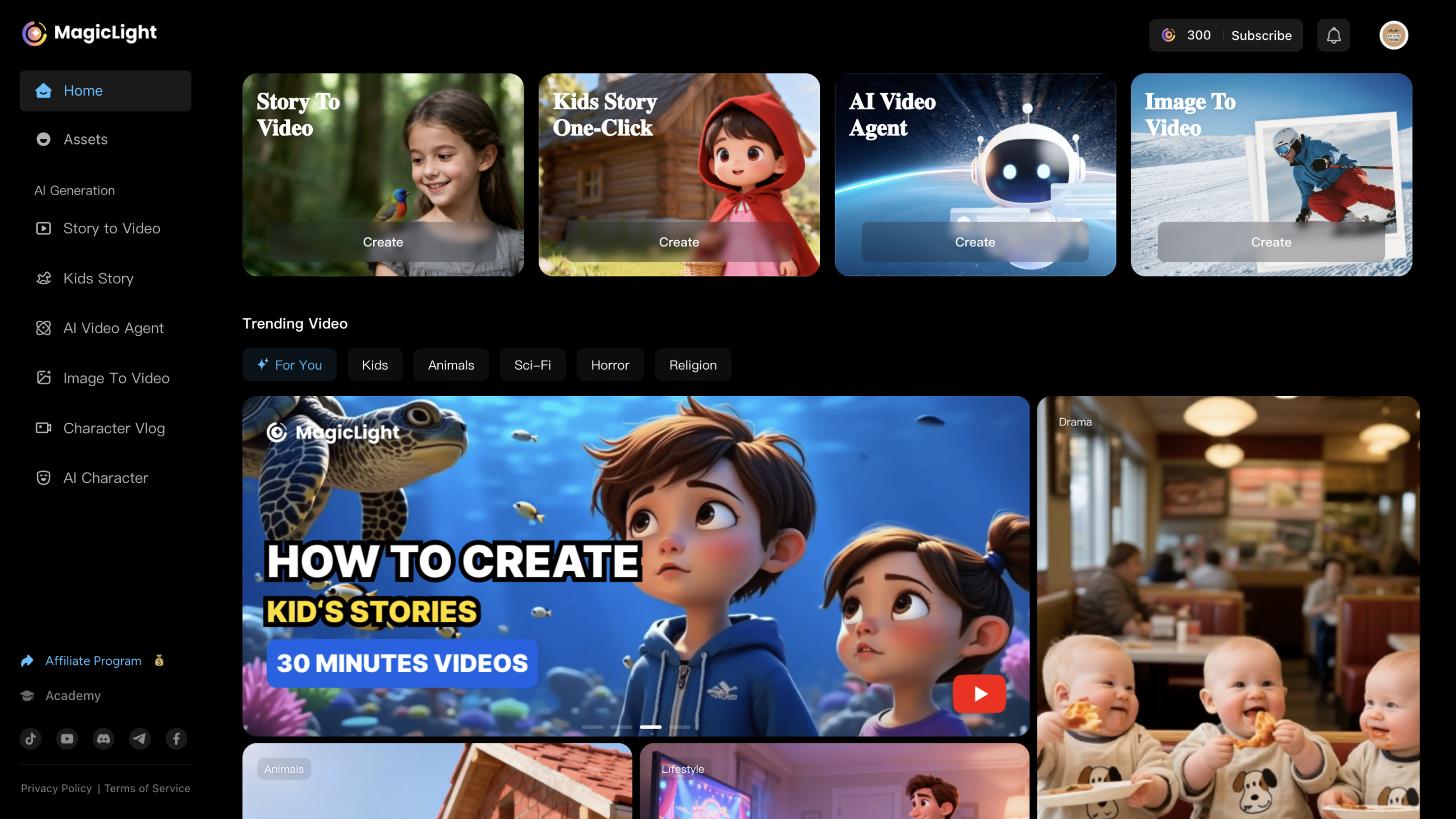
Discover Magic Light AI – the powerful AI video generator that transforms your script into beautiful 3D animated videos, kids stories, and professional video content. Explore features, pricing, pros & cons, and why it’s perfect for creators, marketers, and educators.
The Dream of Creating Stunning Videos—Now Automated
Let’s face it: creating professional animated videos is expensive, time-consuming, and often requires teams of voice actors, animators, and editors. Whether you’re a YouTuber, educator, marketer, or business owner, you’ve probably struggled with:
-
Writing scripts
-
Designing characters
-
Generating visuals
-
Syncing voiceovers
-
Editing the entire video manually
What if one single tool could handle it all—with just a prompt?
That’s where Magic Light AI comes in.
This all-in-one AI video generator turns your written ideas into fully animated videos, complete with 3D characters, voiceovers, transitions, and music. In this review, I’ll walk you through what it is, what it can do, how it compares in price, and why it might just be your favorite new AI tool.
Magic Light AI – Overview

What Is Magic Light AI?
Magic Light AI is a cutting-edge AI animation platform designed to turn text prompts into high-quality videos. From kids’ stories to AI explainer videos, the platform uses advanced AI to automate every step of the video production process—including script analysis, character animation, scene generation, and voice synthesis.
Who Is It For?
-
YouTubers and content creators
-
Teachers and educators
-
Digital marketers and agencies
-
Bloggers and storytellers
-
Entrepreneurs creating product videos
-
Kids’ content creators
Whether you want to build a storybook animation or an explainer video, Magic Light AI removes the production barrier and helps you create in minutes, not weeks.
Key Features of Magic Light AI
Let’s break down what makes Magic Light AI one of the most powerful text-to-3D video generators on the market:
Story to Video
Turn any story or script into a complete video—just paste your text, and the AI handles everything from scene segmentation to animation.
-
Supports up to 12,000 characters (on paid plans)
-
Smart script analysis
-
Automatic visual matching
Kids Story One-Click
Perfect for children’s content creators. Just input your plot and choose a theme—Magic Light generates 3D animated kids’ videos with soft tones, cartoon-style characters, and child-safe music.
-
Ideal for bedtime stories
-
Disney-Pixar style characters
-
Auto-narration included
AI Video Agent
This feature acts like an AI assistant that understands the intent of your script and creates a video aligned with your brand or message. Think of it as an AI Director.
-
Context-aware video rendering
-
Supports up to 50-minute scripts
-
Voice style and tone customization
Image to Video
Upload images and let Magic Light transform them into a motion video. Great for product videos, event recaps, or cinematic intros.
-
Drag-and-drop interface
-
Auto-camera panning & transitions
-
Supports HD 1080p output
AI Character & Character Vlog
Create fully animated AI characters with voice sync. You can build vlogs, tutorials, or story explainers with these avatars.
-
Pre-built or custom avatars
-
Character lip sync + facial expression
-
Vlog templates for fast publishing
10+ Visual Styles
From cinematic to anime to fantasy, Magic Light offers over 10 preset visual themes, allowing users to pick the mood and style that matches their brand or message.
-
Fantasy, Realistic, Cartoon, Anime styles
-
Watermark-free on all plans
-
Visual consistency throughout scenes
Voice Cloning & Narration
Upload your own voice or choose from hundreds of AI-generated voices in different accents and tones. Premium users get voice cloning options.
-
100+ voice options (English + other languages)
-
Voice Cloning (Standard+ plans)
-
Emotion-aware narration
How Magic Light AI Works (Feature Mechanics)

Magic Light AI simplifies the full video production pipeline using artificial intelligence. Here’s what it automates:
-
Script Analysis: Automatically splits your text into scenes and extracts key visual elements.
-
Scene Generation: Renders unique AI-generated scenes with matching backgrounds, characters, and actions.
-
Voice Integration: Applies AI narration or your cloned voice, synced with scene timing.
-
Visual Styling: Applies your chosen style (e.g., 3D cartoon, fantasy, anime).
-
Final Rendering: Generates full HD 1080p video (even on the free plan), ready for download or sharing.
And the best part? You can generate all this without downloading any software.
My Experience Using Magic Light AI
I’ve personally tested over 20 AI video tools—and Magic Light AI genuinely surprised me.
What I Created:
-
A 3-minute children’s story using “Kids Story One-Click”
-
A 1-minute AI explainer video for a product launch
-
A text-to-video vlog using the AI Video Agent
What I Loved:
-
The voice quality felt natural—no robotic tone.
-
Scene transitions and 3D rendering were surprisingly smooth.
-
The entire workflow took less than 15 minutes from start to finish.
What Could Be Better:
-
Occasional mismatch between script emotion and generated scene.
-
Long scripts (above 30 minutes) can take time to render.
Still, for a browser-based tool, Magic Light AI punches way above its weight.
Pricing Plans: Free & Paid Tiers
Here’s a breakdown of Magic Light AI’s pricing as of October 2025:
| Plan | Price | Credits / Month | Key Features |
|---|---|---|---|
| Free | $0 | – | 1-min videos, 3K prompt chars, watermark-free, 10+ styles |
| Standard | $9.5/mo | 5,000 credits | 50-min videos, 1080p HD, voice cloning, 12K chars |
| Plus | $19/mo | 15,000 credits | 3,000 images/day, all Standard features |
| Pro | $28.5/mo | 30,000 credits | Unlimited images/day, 20% off voice cloning + styles |
Bonus: Extra 5% off with invitation code
All paid plans include: Commercial license + watermark-free downloads
Verdict:
-
Best for beginners: Free Plan (1-min videos, still HD!)
-
Best value: Plus Plan ($19/mo) – perfect for frequent creators
-
For power users & agencies: Pro Plan offers unlimited rendering

✅ Pros and Cons
Pros:
-
Super beginner-friendly (no editing experience required)
-
Generates full HD videos—even on free plan
-
Watermark-free output on all plans
-
Great for AI animation and storytelling
-
Wide range of visual styles and characters
-
Affordable pricing for solo creators
Cons:
-
Long-form video rendering (30+ min) can be slow
-
Limited script context understanding in complex stories
-
No multi-language subtitles yet
Who Should Use Magic Light AI?
✅ Perfect for:
-
YouTubers making kids’ videos or animations
-
Teachers creating story-based learning materials
-
Solo marketers making product explainers
-
Storytellers and bloggers bringing their writing to life
-
Anyone who wants to create 3D animated video from text
❌ Not ideal for:
-
Professional studios needing ultra-custom 3D modeling
-
Projects requiring precise scene-by-scene direction
Conclusion: Should You Use Magic Light AI?
If you’re looking for a fast, easy, and affordable way to turn scripts into animated videos, Magic Light AI is a game-changer.
It brings together AI animation, voice generation, and video design into one powerful tool—perfect for creators who want results without hiring a team.
And with a free plan offering full HD output, there’s no reason not to try it.
🔗 Try Magic Light AI Now – Start for Free
👉 Click here to try Magic Light AI
💸 Use my code for 5% OFF any paid plan!