
Synthesia AI is the most advanced talking avatar AI platform that lets anyone create stunning videos with realistic avatars, voiceovers, and dynamic visuals — no camera, mic, or editing skills required.
Creating professional videos used to mean expensive gear, awkward setups, and hours of post-production. But now, you can skip all that and still produce high-quality, engaging content.
In this in-depth Synthesia AI review, we’ll explore how it works, its key features, pricing, pros & cons, and whether it truly lives up to the hype as the best AI avatar generator for businesses, educators, marketers, and creators.
What Is Synthesia AI?
Synthesia AI is a cutting-edge AI video creation platform that lets users turn text into high-quality videos with digital avatars. Instead of recording yourself, you simply choose an avatar, enter your script, and let Synthesia do the rest.
It’s used by over 50,000 companies worldwide — including giants like Google, Reuters, and Accenture — and is especially popular for creating:
- Training videos
- Marketing explainers
- YouTube content
- Internal communications
- Customer onboarding walkthroughs
At its core, Synthesia AI is built for non-technical users who want studio-quality videos without the production hassle.
Key Features of Synthesia AI
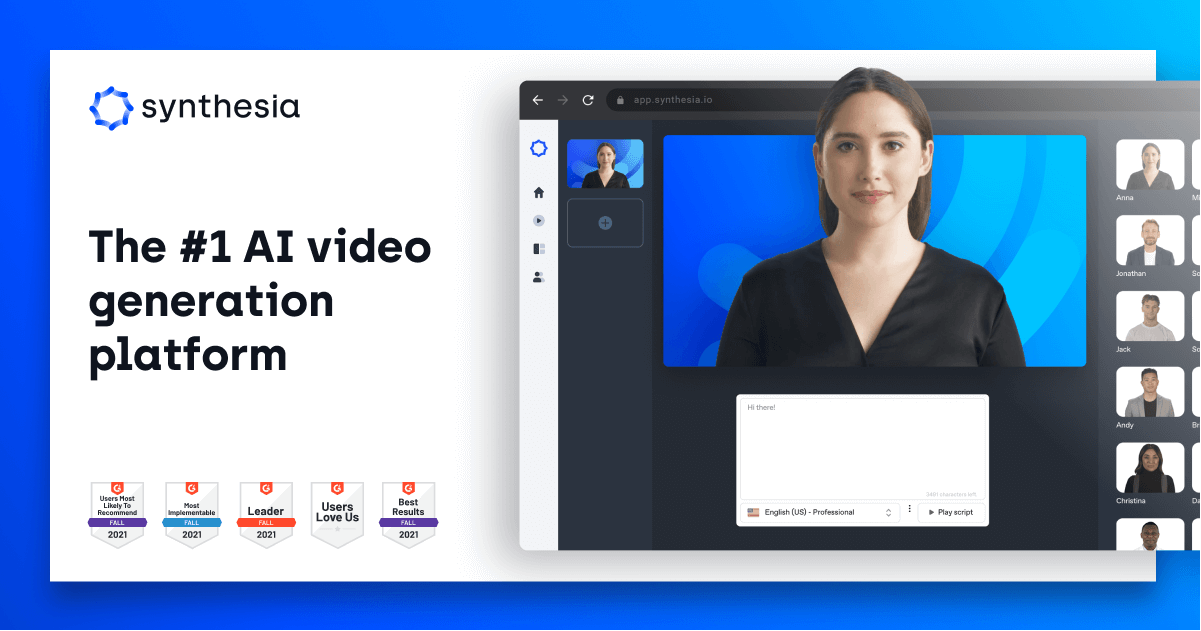
What makes Synthesia one of the top talking avatar AI tools? Here’s a breakdown of the standout features that set it apart:
AI Avatars
- Access 150+ stock avatars or create your personalized avatar with your face and voice.
- Avatars are hyper-realistic and support gestures, blinking, lip-sync, and expressions.
- Avatars available in multiple ethnicities, outfits, and settings.
Voice Cloning
- Clone your own voice in just minutes using a script and webcam recording.
- Perfect lip-sync and tone matching.
- Supports over 120+ AI voices in 130+ languages and accents.
Script-Based Editing
- Just type or paste your script — Synthesia instantly generates scenes.
- The platform auto-splits your text into slides and adds synced avatar speech.
Templates and Branding
- 60+ professional video templates for intros, product explainers, social media, and more.
- Add brand colors, fonts, logos, and watermarks effortlessly.
- Use custom shapes and transitions to elevate your visuals.
Media Library and Custom Backgrounds
- Choose from thousands of stock images, videos, icons, and animations.
- Easily upload your own visuals, logos, or music.
- Personal avatars maintain their real background for authenticity.

Multilingual Capabilities
- Translate and dub videos into 130+ languages with native accent voices.
- Maintain the same avatar across different languages.
Captions and Accessibility
- Auto-generate captions or add manually.
- Customize font, style, and timing.
- Built-in accessibility options for compliance.
Collaboration Tools
- Cloud-based editing.
- Shared project folders, version control, and role-based access.
- Ideal for team workflows in remote setups.
How Does Synthesia AI Work?
Synthesia doesn’t require video editing experience. Here’s what makes the process easy:
- Create your avatar: Use ready-made avatars or upload a video of yourself for a personal AI avatar.
- Input your script: Write or paste your content, and Synthesia generates the video.
- Select your visuals: Pick a background, animations, and images.
- Customize: Add captions, transitions, branding, and voiceovers.
- Export in minutes: Download your HD video in MP4 or share via a link.
Synthesia’s engine auto-generates scene cuts, voice sync, and visuals — saving hours of manual editing.
No camera. No green screen. No studio.
Just text in, video out — thanks to talking avatar AI.
My Experience Using Synthesia AI

I’ve tested over a dozen AI video tools, and Synthesia AI is hands down the most intuitive and polished platform in this category.
Here’s what stood out in my hands-on test:
- Setup was seamless: Account creation and dashboard access took under 5 minutes.
- Custom avatar creation was shockingly simple. I followed the on-screen instructions, uploaded a short video, and my personal avatar was ready within a few hours.
- Voice cloning was equally smooth. I read the sample script, and within minutes I had a voice model that matched my tone and inflections accurately.
- Video creation felt magical. I typed a 200-word script, selected a template, and Synthesia auto-generated a 2-minute video with transitions, avatar speech, and music.
- Editing was fast: I could drag-and-drop logos, tweak slide visuals, and change colors without touching any timeline or layers.
The output? A professional-grade video that looked like it took a whole production crew — but actually took me 15 minutes.
Synthesia AI Pricing – Plans & Value
Synthesia offers flexible plans for individuals and businesses:
✅ Personal Plan – $22/month
- Up to 10 video credits/month (~10 mins total)
- Access to 150+ avatars
- 120+ languages and voices
- 60+ video templates
- Background music, text overlays, and shapes
💼 Enterprise Plan – Custom Pricing
- Includes all personal features +
- Personal avatar & voice cloning
- Collaboration tools
- Premium support
- Full branding customization
- API access for automation

🧾 Notes:
- Each video credit = 1 minute of generated video.
- Unused credits do not roll over.
💡 Pro Tip: The ROI is worth it if you make at least 2–3 videos/month. Compare that to hiring a video editor + voice actor — you’ll save hundreds.
Pros and Cons of Synthesia AI
✅ Pros
- Stunning quality avatars
- Super easy to use — no technical skill needed
- Fast turnaround (videos render in minutes)
- Excellent for multilingual content
- Saves time and money compared to traditional video creation
❌ Cons
- Limited customization for avatar gestures
- Personal avatar creation is only for enterprise plans
- No real-time voice control — everything is script-based
- Limited video lengths per pricing tier
Who Should Use Synthesia AI?
Synthesia AI is perfect for anyone who wants to create videos without being on camera.
Ideal for:
- Content creators: Create YouTube videos with digital presenters.
- Marketers: Build explainer or sales videos for products/services.
- Educators: Develop training materials or online courses.
- HR & Corporate teams: Internal onboarding, remote training.
- Agencies: Scale client video production quickly.
If you’re looking for a talking avatar AI that’s fast, flexible, and professional — this is it.
Alternatives to Synthesia AI
While Synthesia is a leader, here are a few alternatives worth comparing:
| Tool | Strengths | Weaknesses |
| HeyGen | Realistic avatars, auto voice clone | Less stable for long videos |
| Pictory | Video summaries from blog posts | No avatars |
| D-ID | Real photo avatars, fast render times | Limited UI/UX |
| Elai.io | Good templates + voice library | Avatar quality not as high |
👉 But none match Synthesia’s balance of realism, ease, and international language support.

Is Synthesia AI Worth It?
If you’re serious about creating talking avatar videos that look polished and save you hours — Synthesia AI is absolutely worth it.
Whether you’re a solopreneur, small business, coach, or educator, this tool gives you the power of a professional video team in your browser. It’s fast, fun, and incredibly scalable.
✅ No more hiring actors.
✅ No more editing headaches.
✅ Just type → customize → publish.
🎯 Get Started With Synthesia AI Today
Ready to try it for yourself?
👉 Click here to sign up for Synthesia AI
Start with the personal plan and make your first AI avatar video in under 15 minutes.
Once you try it, you’ll never go back to traditional video creation again.