
Singify AI is redefining how music is made. Instead of hours in a studio or expensive software, you can now create complete songs, viral AI covers, and even clone your own singing voice — all powered by artificial intelligence. Whether you’re a content creator or music lover, Singify AI helps you turn simple ideas into professional-sounding tracks within minutes.
Singify AI Overview – What It Is and Why It Matters
What is Singify AI?
Singify AI is a cloud-based music creation platform developed by Fineshare (launched circa 2022) that leverages artificial intelligence to generate songs, produce AI-powered covers of existing tracks, clone singing voices, and provide various music-production utilities such as stem splitting, lyric generation, text-to-music conversion, and more.
What is the goal?
The core purpose of Singify AI is to democratize music creation—removing the steep barrier of musical training, instrumentation, studio time or complex DAWs (Digital Audio Workstations). Whether you’re an aspiring songwriter, a content creator needing background music, a social-video producer making short clips, or someone wanting to make an “AI Cover” of a song, this platform promises to simplify that workflow.
By enabling “idea to song” and “existing song to AI cover” workflows, Singify AI aims to transform the way music is created, published, and used in content. Especially in the age of YouTube, TikTok and streaming, the ability to rapidly generate songs or covers can be a game-changer.
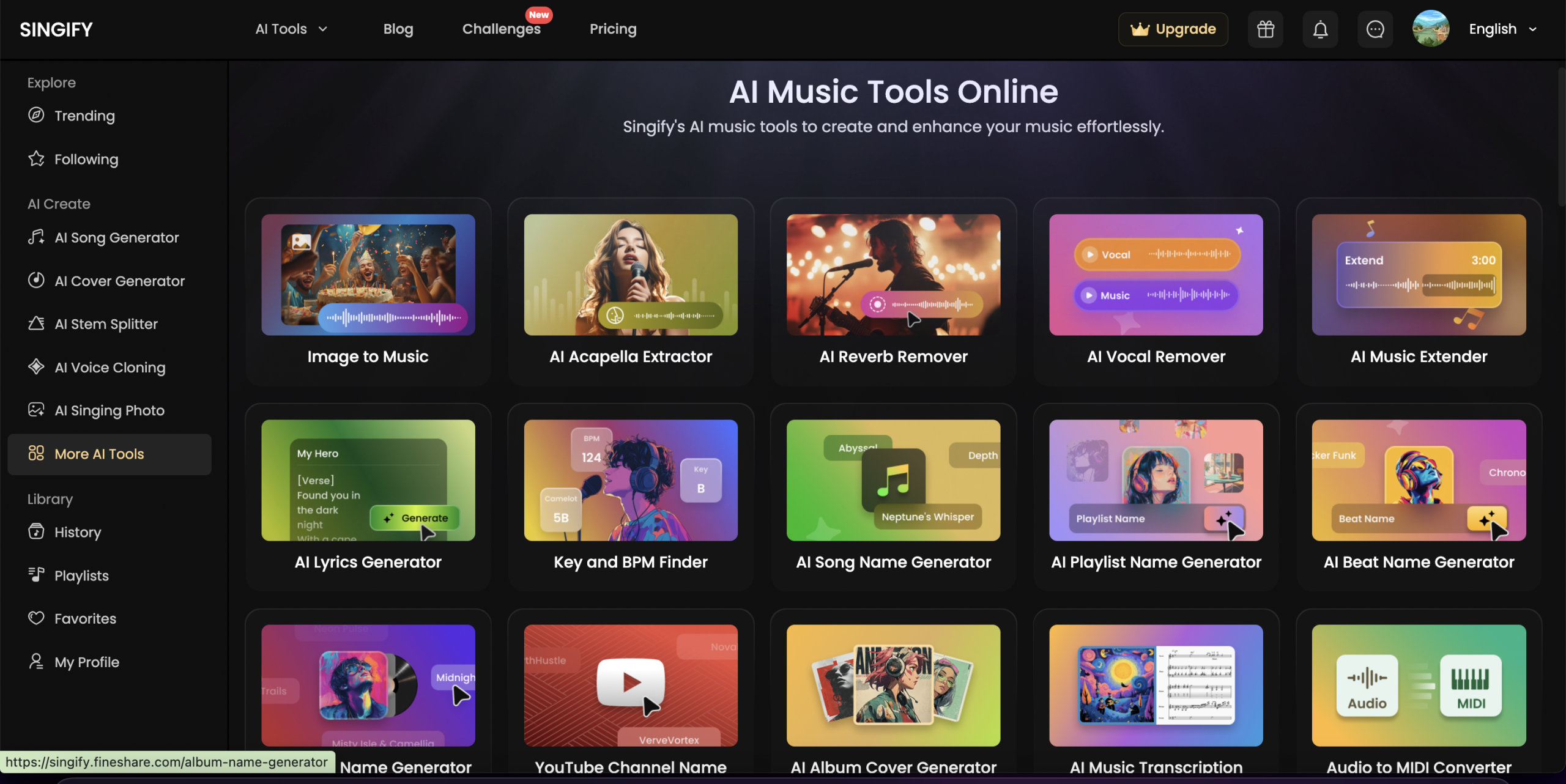
Key Features of Singify AI
Here are the major features of Singify AI, along with how they contribute to its appeal.
1. AI Song / Music Generator
Singify allows you to input a prompt (for example: “a vibrant 1990s style pop song about summer romance”), lyrics, or even an image or video reference—and then the AI generates a full track: melody, instruments, vocals.
This is especially powerful for creators who have a lyrical idea or mood but not the musical skills to compose a full song.
2. AI Cover Generator (the “AI Cover” keyword in action)
One of the standout aspects is the AI cover-tool. Upload an existing song (or provide a link), select an AI singer voice, and Singify automatically produces a new version of that song. The voice may mimic a certain style, or you can upload your own voice for cloning.
This is where “AI Cover” becomes central: many creators on YouTube use Singify AI to make unique covers of popular songs, often yielding high engagement.
3. AI Voice Cloning & AI Singer Library
Singify offers a wide library of AI singing-voice models (100+ or even 1000+ depending on source) and supports custom voice cloning—meaning you could train the system with your own voice (or another voice) and use it as a singing voice for your songs.
This gives huge flexibility: you’re not locked to one voice.
4. AI Stem Splitter / Vocal Remover / Music Extender
Beyond generation, Singify AI includes utilities to split audio stems (vocals, bass, drums, etc.), remove vocals, extend a track, detect BPM and key.
These features are valuable for content creators who want to remix, remix or repurpose audio.
5. Multi-Modal Inputs (Text, Image, Video, Audio)
You can start with:
- text prompts (lyrics or mood)
- lyrics uploads
- images or videos (to convert mood into music)
- existing audio for covers or remixesThis breadth gives creative freedom.
6. Diverse Genre & Style Support
Pop, rock, EDM, jazz, classical, R&B, country, folk and more. Singify supports multiple genres and style selections so you’re not limited to one sound.
So whether you want an “AI Cover” of a rock anthem or a new cinematic soundtrack, it supports it.
7. Royalty-Free Use & Publishing Ready
From the official site: songs generated are 100% royalty-free for you to use in your videos, content, or commercial projects.
That makes Singify AI appealing for YouTube creators, marketers, and anyone needing music for publishing.
8. Intuitive, Beginner-Friendly Interface
According to reviews, the UI is designed so non-musicians can navigate it, push prompts, select voices, and get output quickly—with minimal learning curve.
How Singify AI Works (Feature-Focused Overview)

Rather than step-by-step instructions, here are the functional workflows that illustrate how to use Singify at a feature level:
- Prompt to Song: Enter an idea or text (e.g., “melancholic acoustic ballad about missed connections”), choose style, select a singer voice—then generate.
- Lyrics to Song: Upload your written lyrics, pick melody style and voice, and create a full track.
- Image/Video to Music: Supply an image or short video, and Singify will analyze mood and tone to generate a matching musical piece.
- AI Cover Workflow: Upload or link to an existing song → choose an AI voice or clone your own → apply the voice and generate a new cover version. This is a direct application of “AI Cover”.
- Stem Separation / Remixing: Take an existing track, use the stem splitter or vocal remover to isolate parts (vocals, drums etc), optionally extend the piece or alter instrumentation, then re-publish or reuse.
- Voice Cloning: Record or upload a sample of a voice (your own or another), let the system train a custom AI singer, then use that voice in future compositions.
- Publishing & Export: Once generated, download the track (usually in WAV/MP3 format), royalty-free, ready for YouTube, social, podcast, video, or game use.
My Real Experience Using Singify AI
I had the chance to experiment personally with Singify AI (especially focusing on the “AI Cover” feature) and here’s how it felt:
- Initial Setup – After signing up, I entered a prompt like “nostalgic indie pop about long-distance friendship” and chose a mid-female voice in the AI singer library. Within minutes, I had a full song with verses, chorus, instrumentation and vocals. The result was surprisingly polished for a first try—much better than I expected for a non-musician.
- Cover Test – I uploaded an easy pop track (public domain) and selected a different voice model. Singify AI quickly generated a version where the vocals sounded distinct but believable. It wasn’t perfect (some lyric enunciation was a little robotic), but for a YouTube background or social clip, it was strong.
- Voice Cloning – I tried uploading my own voice (via a short recording) to clone. After a short training period, I used that voice to produce a short track, which felt personal and fun.
- Stem Splitter & Remixing – I took an existing royalty-free instrumental, used the stem splitter to isolate the melody and percussion, then extended and re-arranged via Singify. This was slower and more experimental but worked.
- Publishing Mindset – Because Singify promises royalty-free output, I felt comfortable using the track in a test YouTube video. The sense of “I created this with AI” is empowering.
- Learning Curve – While basic workflows are straightforward, some of the deeper features (voice cloning, fine-tuning instrumentation) require a little experimentation. For best results, tweaking prompt wording and voice selection matters.
Overall: I found Singify AI impressively accessible and surprisingly robust for what it claims. For creators wanting to experiment with “AI Cover” workflows or generate original tracks quickly, it ticks the boxes.
Singify AI Pricing Plans

Here’s a snapshot of what is known (as of late 2025) about Singify AI pricing, and how to evaluate it:
My assessment: The pricing is quite compelling for the value. At ~$9/month (Basic), if you’re generating a few short songs or covers each month, it’s affordable compared to hiring musicians or studio time. The Pro tier gives more headroom and customisation. The free/trial tier is a great way to “how to use Singify” and test the platform without major commitment. Be aware of credit limits—heavy users or commercial creators may need higher tiers.
Singify AI Pros & Cons
👍 Pros
- Extremely easy for non-musicians to generate full songs and covers.
- Powerful “AI Cover” workflow: upload a song, pick a voice, get a new version.
- Large voice model library (100+ up to 1000+ depending on source) and genre/style variety.
- Royalty-free output, enabling creators to publish without major licensing issues.
- Multi-modal inputs (text, image, video, audio) increase creative flexibility.
- Affordable pricing tiers and free trial availability.
- Useful tools beyond generation (stem splitting, voice cloning, extending) for remixers and content creators.
👎 Cons
- While impressive, AI-generated vocals still may lack the nuance or emotional depth of top human singers; some output may sound slightly synthetic.
- Heavy reliance on internet/browser; offline workflow is limited.
- Credit-based system may become restrictive for high-volume users; additional credits may cost extra.
- The vast number of options and voices may overwhelm beginners without guidance or best-practice templates.
- For commercial music artists seeking full control, instrument specificity, mixing/mastering depth, Singify may not replace a full-fledged DAW + studio production.
Who Should Use Singify AI?
Singify AI is especially suitable for:
- Content creators (YouTube, TikTok, Instagram) who need quick, royalty-free songs or covers.
- Solo musicians or songwriters with ideas (lyrics/melody) but limited production resources.
- Remixers, DJs, karaoke creators who want to spin existing songs into new covers (“AI Cover”).
- Game developers, filmmakers or video producers needing background music or theme tracks without hiring a composer.
- Educators or hobbyists exploring music creation without deep music-theory knowledge.
If you are a top-tier professional musician seeking every micro-detail of mixing/mastering or who demands bespoke session work, Singify AI may be part of your workflow—but likely not the sole solution.
Singify AI vs Alternatives – How It Compares
If you’re considering Singify AI, it’s useful to compare with alternatives in the “AI music / AI cover” space:
Alternatives
- Suno AI – Another generative music tool with realistic vocals and instrumentation.
- Mureka – Focused more on music generation (instrumentals plus some vocals).
- Udio – AI music generator oriented toward prompts and instrumentals rather than full vocal songs.
Why Singify AI might be the better choice
- Strong emphasis on the “AI Cover” workflow (upload existing song → new voice).
- Voice cloning feature gives personalization.
- Stem splitting and remix tools built-in; many alternatives focus just on generation.
- Extensive library of voices and genres means you have more creative flexibility.
Where others may lead
- Some alternatives may offer slightly more advanced mixing/mastering control or integrate more deeply with DAWs.
- If your main need is pure instrumental background music without vocals, simpler/cheaper tools may suffice.
Conclusion – Why Singify AI Is Worth Trying Today
To sum up: If you’re seeking a tool that enables you to turn your musical ideas into finished tracks, or to produce fresh versions of existing songs via “AI Cover”, Singify AI is a compelling, modern platform. It brings together a rich feature set—song generation, voice cloning, cover creation, stem separating—and wraps it in an intuitive interface plus affordable pricing. It democratizes music creation in a way that was unthinkable a few years ago.
Whether you’re making music for your YouTube channel, creating audio for marketing, or simply experimenting with “how to use Singify” for fun, it gives you rapid, creative output with minimal traditional music-production overhead.
If you’re ready to explore: sign up for the free trial of Singify AI, test a prompt-to-song or make an “AI Cover” of a favourite track. After creating your first piece, consider upgrading to the Basic or Pro tier if you find the results compelling.
Ready to elevate your music-creation workflow? Try Singify AI today, and start turning ideas into songs, covers into viral clips, and your creative vision into reality.